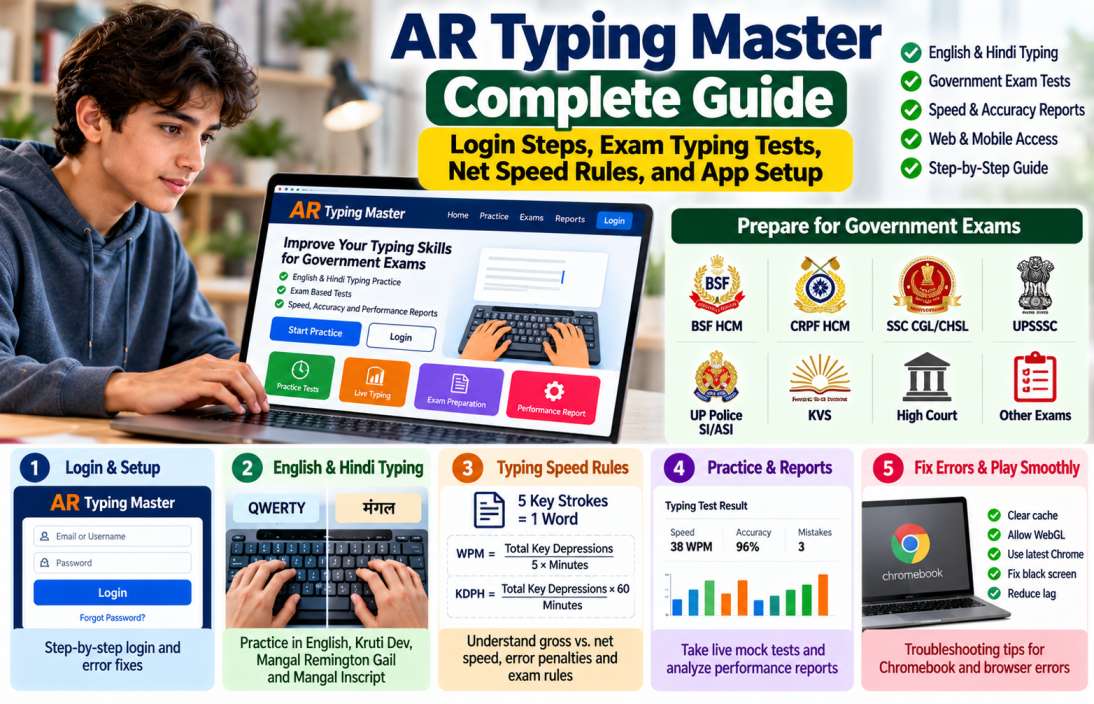

Preparing for a government typing test? Improving typing speed alone may not be enough. You must meet the required speed, maintain accuracy, and follow the keyboard layout used in your recruitment exam.
AR Typing Master and AR Typing Platform offer online typing practice for candidates preparing for government exams. Their features include timed tests, English and Hindi passages, exam-based practice, error analysis, and performance reports.
Candidates preparing for BSF HCM, CRPF HCM, UP Police, UPSSSC, KVS, SSC, and High Court exams can use these platforms to build typing skills.
This guide explains how to register, log in, fix session errors, understand key depressions, calculate typing speed, and analyse mock test results.
What Is AR Typing Master / AR Typing Platform?
AR Typing provides browser-based typing practice for students preparing for competitive examinations.
The two websites have different interfaces:
- AR Typing Master: artypingmaster.com offers beginner tests, speed tests, accuracy practice, paragraph typing, exam preparation, and performance reports.
- AR Typing Platform: artypingplatform.com focuses on exam-pattern passages, live typing, rule-based evaluation, and performance dashboards.
Both websites promote English and Hindi typing practice. Their registration pages and login systems are separate.
Tailored Skill Test Modules for Government Exams
Government typing tests do not all follow the same rules. Some require a particular speed, font, keyboard layout, passage length, or error calculation method.
AR Typing Platform has an exam directory with categories such as BSF, KVS, SSC CGL, SSC CHSL, UP Police, UPSSSC, and several High Courts. Its blog section publishes exam-specific typing guides.
AR Typing Master describes its practice modules as suitable for SSC CHSL, CGL, RRB NTPC, HCM, High Court, and state-level typing examinations.
Common practice options include:
| Practice Module | Purpose |
|---|---|
| Beginner Typing Test | Learn keyboard positions and improve accuracy |
| Speed Typing Test | Increase typing speed |
| Accuracy Practice | Reduce spelling and typing errors |
| Paragraph Typing | Practise continuous passage typing |
| Exam Preparation | Practise recruitment-based passages |
| Live Typing | Simulate timed examination conditions |
| Performance Report | Review speed, mistakes, and accuracy |
These modules help you prepare under timed conditions. But a practice result does not guarantee qualification in the actual recruitment examination.
Support for English and Hindi Typing Layouts
English typing generally uses the familiar QWERTY keyboard. Hindi typing needs more attention because recruitment notices may prescribe a particular font and keyboard layout.
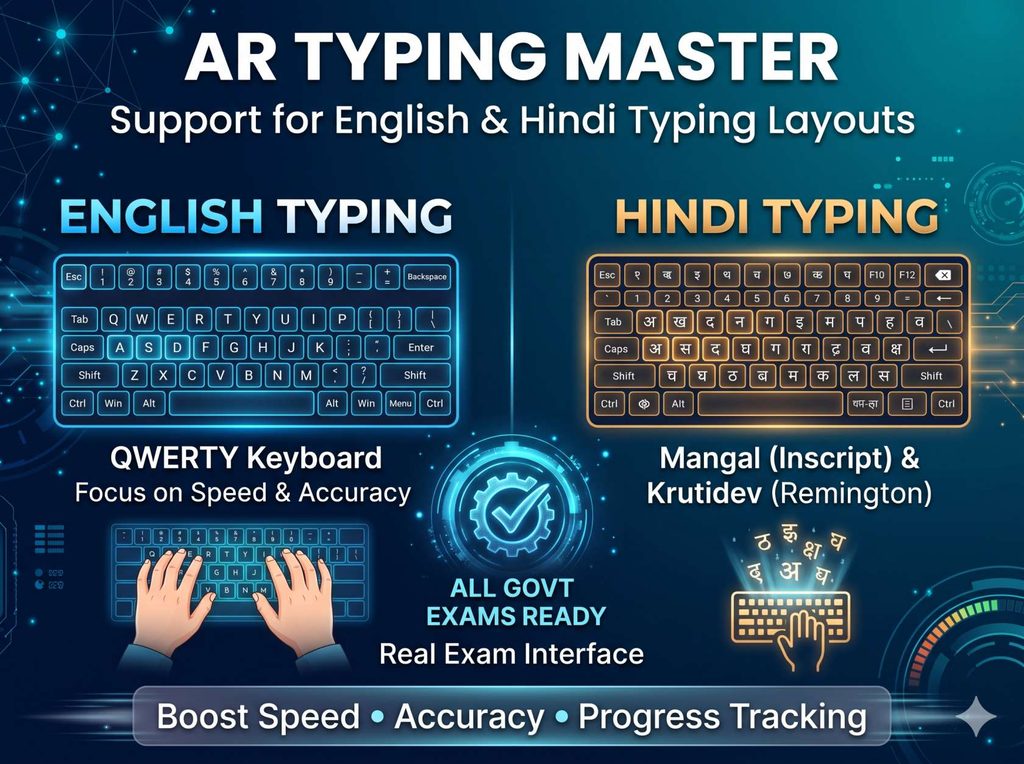
Common Hindi typing options include:
| Font or Layout | Description |
|---|---|
| Kruti Dev 010 | Legacy Hindi font commonly used with a typewriter-style keyboard layout |
| Mangal Inscript | Unicode Hindi font used with the Inscript keyboard layout |
| Mangal Remington Gail | Mangal Unicode font used with the Remington Gail keyboard layout |
Remember that a font and a keyboard layout are not the same thing.
For example, the CRPF HCM 2022 recruitment notification prescribed Mangal font with the Remington Gail keyboard layout for its Hindi typing test. This is an example of an exam-specific requirement, not a universal rule for all Hindi typing examinations.
Before selecting a practice module, check the exact font and layout in your recruitment notice.
AR Typing Master Login and Account Troubleshooting
You can access the platforms through a web browser. A laptop or desktop with a physical keyboard is the better choice for serious typing practice.
How to Register and Login to AR Typing Master
There are two separate registration processes.
Option 1: AR Typing Master
- Open artypingmaster.com.
- Select Register.
- Enter your full name.
- Enter your email address and phone number.
- Create a password.
- Select Create Account.
- Return to the login page.
- Enter your email address and password.
You can access the direct AR Typing Master registration page.
For an existing account:
- Open the AR Typing Master login page.
- Enter your email address.
- Enter your password.
- Select Login.
The login page includes a Keep Me Signed In option. Use it only on a personal device.
Option 2: AR Typing Platform
- Open artypingplatform.com.
- Select Create Account.
- Choose Student if you are registering for personal practice.
- Enter your first name and last name.
- Add your email address.
- Create a password.
- Accept the terms and privacy policy.
- Select Signup as Student.
The platform also offers an Institute registration option. (AR Typing Platform registration)
After registration, visit the AR Typing Platform login page and enter your email and password.
Important: Do not confuse the two login pages. Check the website address before entering your credentials.
Resolving “Session Already Active” and Authentication Failures
Sometimes the typing platform may show an active-session error or fail to open your account.
AR Typing Platform provides a Clear Session option on its login page. This can help when an earlier browser session prevents a fresh login.
Try these steps:
- Open the AR Typing Platform login page.
- Select Clear Session.
- Return to the login form.
- Enter your email and password again.
- Try signing in.
If the problem continues, try these fixes:
- Clear browser cache and cookies.
- Close duplicate tabs containing the same platform.
- Sign out of old sessions when possible.
- Restart Chrome or Edge.
- Open the website in an Incognito window.
- Check your internet connection.
- Update your browser.
On AR Typing Master, the public login page does not display the same Clear Session button. Use its own password recovery option or contact its support team if the account remains inaccessible.
How to Reset Your Password on AR Typing Online
The recovery process differs between the two websites.
AR Typing Platform:
- Open the Forgot Password page.
- Enter your registered email address.
- Enter your registered mobile number.
- Select Request Key.
- Follow the verification instructions.
- Complete the password recovery process.
The platform’s FAQ says that password recovery uses the registered email address and phone number. It allows up to three OTP requests per day, with a typical OTP validity of 30 minutes.
AR Typing Master:
- Open its Forgot Password page.
- Enter your registered email address.
- Follow the instructions displayed on the page.
Do not share your password or recovery code with another person.
Exam Rules and Speed Calculation: Gross WPM vs. Net WPM
Typing speed is one of the main factors in government computer skill tests.
Most candidates see two measurements:
- WPM: Words per minute.
- KDPH: Key depressions per hour.
The standard conversion often uses five key depressions for one word.
Understanding Key Strokes and Character Rules
A key depression means pressing a keyboard key. Depending on the evaluation method, spaces and punctuation can form part of the total count.
The common conversion is:
1 word = 5 key depressions
The formulas are:
[
\text{WPM}=\frac{\text{Total Key Depressions}}{5\times\text{Minutes}}
]
[
\text{KDPH}=\frac{\text{Total Key Depressions}\times60}{\text{Minutes}}
]
For example, assume a candidate types 1,750 key depressions in 10 minutes.
| Calculation | Result |
|---|---|
| Total key depressions | 1,750 |
| Standard word count | 1,750 ÷ 5 = 350 |
| Test duration | 10 minutes |
| Gross typing speed | 35 WPM |
| Key depressions per hour | 10,500 KDPH |
This is the basic conversion. It does not account for mistakes or recruitment-specific deductions.
Example: CRPF HCM Typing Speed
The CRPF HCM 2022 notification specified:
| Language | Required Speed | Equivalent KDPH |
|---|---|---|
| English | 35 WPM | 10,500 |
| Hindi | 30 WPM | 9,000 |
The notification used the average of five key depressions per word. It also specified a qualifying typing test.
The same figures should not automatically be applied to BSF, SSC, UPSSSC, or other recruitment tests. Always check the latest notice for your examination.
Gross WPM vs. Net WPM
Gross WPM measures the raw typing speed before error deductions.
Net WPM considers the mistakes or penalties defined by the relevant examination.
For a simple practice example:
| Measurement | Value |
|---|---|
| Gross speed | 40 WPM |
| Equivalent penalty | 5 words |
| Net speed | 35 WPM |
The example shows the difference between raw and adjusted speed. Actual recruitment calculations can use different error rules, so this simple subtraction is not a universal exam formula.
For example, SSC CGL 2026 specifies a 15-minute DEST using a passage of about 2,000 key depressions. The test is qualifying in nature, and higher standards can apply to certain posts.
Error Penalties, Full Mistakes and Half Mistakes
Not every typing error receives the same penalty.
SSC’s published typing evaluation guidelines distinguish full mistakes from half mistakes.
| Error Type | Examples |
|---|---|
| Full mistakes | Missing a word, replacing a word, adding an extra word, spelling errors, incomplete words |
| Half mistakes | Spacing errors, wrong capitalisation, punctuation errors, transposed words, paragraph formatting errors |
These categories are explained in the SSC typing test evaluation guidelines.
The final calculation depends on the examination’s evaluation rules.
CRPF HCM example: The 2022 notification allowed mistakes equal to 5% of the words actually typed. For each mistake beyond that permissible limit, 10 words were deducted from the total words typed when calculating actual speed.
This differs from an evaluation system that assigns full and half mistakes individually.
Is Backspace Allowed During Government Typing Tests?
There is no single answer for every examination.
Some recruitment tests permit corrections with Backspace and Delete. Others may define specific correction rules or restrict keyboard functions.
For example, the CRPF 2022 notification stated that the department would decide the mode and procedure for conducting its skill test. The notice did not establish a universal Backspace rule for all exams.
AR Typing Platform’s FAQ says its evaluation system considers incorrect characters, missed spaces, and Backspace usage.
Practise using the same correction method stated in your recruitment notice. Do not build your entire preparation around unlimited Backspace unless the actual exam permits it.
How to Practice Live Mock Tests and Analyse Reports
Regular mock tests help you understand your current speed, error patterns, and areas that need more work.
Both AR websites offer timed practice and progress tracking, but their interfaces and reports differ.
Selecting Beginner, Speed, and Live Competition Tests
On AR Typing Master, you can select from beginner tests, speed tests, accuracy practice, paragraph typing, and exam preparation.
On AR Typing Platform, the main features include exam-pattern passages, on-demand exam interfaces, and daily live typing sessions.
A useful practice plan could look like this:
| Practice Type | Suggested Duration | Main Goal |
|---|---|---|
| Beginner practice | 3 minutes | Keyboard familiarity |
| Speed practice | 5 minutes | Improve typing rhythm |
| Accuracy practice | 5 minutes | Reduce errors |
| Exam simulation | 10 minutes | Build speed under pressure |
| Long mock test | 15 minutes | Improve endurance |
| Live typing | As scheduled | Compare performance with other users |
These are suggested practice durations. Use the exact time prescribed by your recruitment examination for final mock tests.
A practical daily routine:
- Start with a short warm-up passage.
- Complete one accuracy test.
- Practise the required English or Hindi layout.
- Attempt a timed exam passage.
- Review your mistakes.
- Repeat difficult words and letter combinations.
- Record your daily score.
For Hindi typing, spend extra time on difficult character combinations and keyboard positions.
Reading Your Performance Analytics and Accuracy Score
A typing report can show more than your final WPM.
AR Typing Platform advertises an individual performance dashboard, error calculations, exam-based results, and practice history. AR Typing Master offers reports covering speed, accuracy, mistakes, and progress.
Important measurements include:
| Metric | What It Tells You |
|---|---|
| Gross WPM | Raw words typed per minute |
| Net WPM | Speed after the relevant penalty |
| KDPH | Key depressions per hour |
| Accuracy | Share of correctly typed content |
| Full mistakes | Major typing errors |
| Half mistakes | Errors with a smaller penalty where applicable |
| Error percentage | Mistakes compared with the typed passage |
A simple practice accuracy formula is:
[
\text{Accuracy}=\frac{\text{Correct Characters}}{\text{Total Characters Typed}}\times100
]
This formula is useful for general practice. The official examination may calculate accuracy or mistakes differently.
How to improve your report:
- Focus on accuracy before increasing speed.
- Review repeated spelling errors.
- Practise difficult Hindi characters separately.
- Compare results across similar test durations.
- Track your net performance rather than gross speed alone.
- Repeat the same exam module to measure progress.
A steady improvement in accuracy and speed is more useful than one unusually high mock-test score.
AR Typing Master vs. AR Typing Platform: Which Should You Use?
Both websites offer typing practice, but their published features differ.
| Feature | AR Typing Master | AR Typing Platform |
|---|---|---|
| Registration | Available | Available |
| Beginner tests | Yes | Exam-based practice |
| Speed tests | Yes | Yes |
| Accuracy practice | Yes | Rule-based evaluation |
| Exam passages | Yes | Yes |
| Live typing | Not clearly listed on its public home page | Yes |
| Performance reports | Yes | Yes |
| Clear Session button | Not visible on login page | Available on login page |
| Free practice | Advertised | Limited free daily plan |
AR Typing Platform currently lists three free practice tests per day. Its pricing page offers additional plans for unlimited practice and advanced reports.
One more important point: AR Typing Platform’s declaration states that it is an independent practice website and has no affiliation or endorsement from recruitment agencies or government departments. Its mock results are for preparation, not official recruitment results.
Final Checklist Before Your Government Typing Test
Before starting a mock test or appearing for the actual exam, check these points:
- Confirm the exact recruitment examination.
- Check the required WPM or KDPH.
- Select the correct English or Hindi keyboard layout.
- Confirm the prescribed Hindi font.
- Practise with the required test duration.
- Understand full and half mistake rules where applicable.
- Check whether Backspace and Delete are permitted.
- Complete full-length mock tests.
- Review your net speed and error report.
- Follow the latest official recruitment notification.
Final Thoughts
AR Typing Master and AR Typing Platform can help government job aspirants improve typing speed and accuracy through regular online practice.
Their main value is the chance to practise timed passages, review mistakes, and become familiar with examination-style typing interfaces.
But the platform’s scoring rules should never replace the official recruitment notice. BSF, CRPF, SSC, UPSSSC, KVS, and High Court examinations can use different speed requirements, Hindi layouts, and error deductions.
Build your typing routine around your target examination. Practise daily, review your reports, and focus on accurate typing before chasing higher WPM.
Official and platform resources used: AR Typing Master, AR Typing Platform, CRPF recruitment notification, and SSC examination notice.