
It’s not easy to become a top-tier video editor. However, with time and experience, you’ll be editing like an expert. So, if you’ve been planning to make or edit professional videos, you might need the right tool to support your initiative. With so many options available, you want to be sure you pick the right one. Because of the availability of free software and the sharing of knowledge on the internet, amateurs can now edit video. There is a vast choice of video editing software available to make it simple to edit your movies. Whether you want a basic editor or professional-grade editing software, you can get it, and sometimes within your budget.
Things To Keep In Mind Before Start Editing Videos
You can edit a video as you want it to be. No matter how intricate you want the end output to be, you will find the process considerably more pleasurable if you take a little time to prepare from the outset, preferably before you begin recording any footage.
- Know Your Requirements
The requirements for various sorts of videos vary. You might be editing your video for YouTube, or just creating an Instagram reel. So, understand your requirements first and then proceed to choose an editing tool.
- What Capabilities Do You Want In The Software?
Every video editing tool has a learning curve, and the number of features and the amount of work necessary to master the software are linked. Consider if you simply want the fundamentals, such as a drag-and-drop editing paradigm and a relatively short learning curve, or whether you want to invest time in learning a more sophisticated and feature-rich software.
- Device You Will Use For Video Editing
All of your video editings is going to be done on a device, be it a computer or a mobile phone. So, you need to consider the device of your convenience and then find the right tool compatible for editing on that particular device. There has long been debate about which operating system is superior for video editing. You can use any operating system that you find convenient. There is no difference.
Things To Look In Video Editing Apps
- Pricing
Decide how much you are willing to pay as a starting point. There are free video editing software solutions, but they can have poor performance, restricted file format compatibility, a lack of significant editing tools, and a variety of other drawbacks. Higher-end software for professionals, on the other hand, might cost thousands of dollars and have numerous functions that you will almost certainly never use. Choose software that will meet all of your video editing demands within your budget.
- Ease Of Use
When choosing video editing software, it is critical to examine how simple it is to learn and master. The last thing you want to do is invest money in software only to spend months learning how to edit your first video. To begin started, look for software that has video editing templates and auto modes. Auto modes allow you to input media, choose a video style, and then your video is automatically composed for you.
If you use a pre-designed template, you’re guaranteed to make a great video! It’s perfect for busy users and business owners who have less time to create a video from scratch. It’s handy that the creative templates, especially for video ads, come in the right social media dimensions too.
- Free Stock Media
If you don’t have original videos to use during video editing, you can choose video editing software that comes with a stock media library of photos, videos and GIFs to help you make your video from scratch.
- Types Of Format Supported
Video quality and formats are always changing, and it might take some time for the software to catch up. Most consumer-level video editing software is capable of exporting video in good quality and in the most popular formats, so you can be confident that you’ll have a minimal issue uploading your films. If you intend to create 4K films, make sure you have a powerful computer, ideally one with a dedicated graphics card, as processing 4K video may use a large number of computational resources and time.
- Customer Support
You may never need to utilize a company’s customer service, but when you do, you want it to be prompt and helpful. You should opt for a provider that provides significant customer assistance.
- Special Effects, Music, and Other Perks
Videos with professional-looking graphics and titles, background music, and other effects combined with Premiere Pro’s Glitch transition achieve more popularity on the internet. Effects and music, with a will cost you extra depending on the video editing software you use. Make sure the video editing software you choose has unique effects, templates and music, otherwise you will end up with videos that lack that spark to capture the attention of the audience.
The Right Tool For Video Editing In The Market
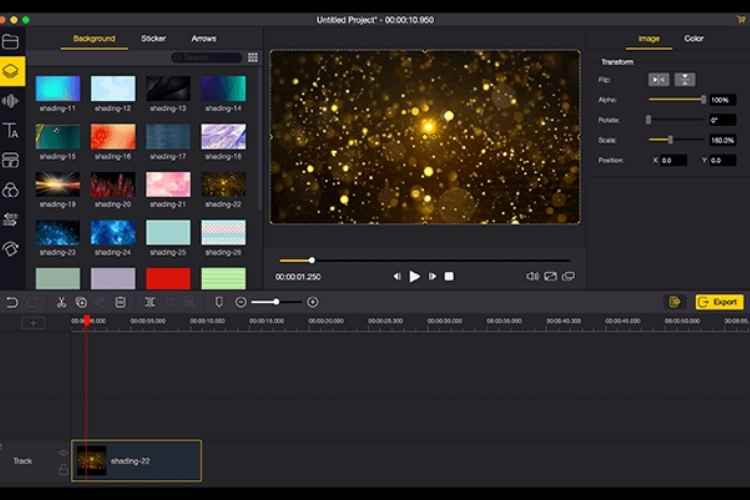
These days, there is a huge demand for advanced software for video editing. But most of them are quite costly. If you want to get high-end features, then choose TunesKit AceMovi Video Editor. It is the right tool available in the market for both Mac and Windows users. It is a simple yet advanced video editing tool that can help you enhance the magic of your videos. The tool offers a wealth of features to improve your video editing experience. In fact, you are provided with the free trial service of TunesKit AceMovi Video Editor. Just explore its features and services and then make then buy the software to have the best video editing experience of your life. You can edit video and save it in any popular video and audio format including MP4, M4V, MOV, MKV, MPG, MP3, WAV, etc. It is customized to be used in different devices such as iPhone, iPad, Apple TV, Galaxy series, Huawei, Xbox, PSP, LG TV, and more. Once the video is edited, it can be shared anywhere and on any platform like YouTube, Instagram, Vimeo, Facebook, etc. To know how to use the software and craft amazing videos, you can subscribe to its YouTube Channel (https://www.youtube.com/c/AceMoviVideoEditor/videos).
Pros and Cons of Using TunesKit AceMovi Video Editor
Pros
- The User Interface of the tool is quite straightforward and friendly
- Beginner level editors can use it
- Compatible with diverse devices
- Video export in different formats
- You have templates, video transitions and visual effect to choose from
- Installation is very easy
- Easily export videos to social media platforms
- Supports 4K resolution
- Offers free trial to users
- Greater control of editing process
Cons
- Doesn’t offer cloud storage
- Not available for free
- Editing professional videos takes hours
- Audio mixing might be difficult
- Doesn’t support old file formats
Tips For Better Editing Using TunesKit AceMovi Video Editor
If you want to make your editing process smooth while using TunesKit AceMovi Video Editor then follow the tips –
- Shoot your videos according to plan.
- Arrange the videos with strategy and then make the final composition
- Go easy with effects in videos.
- Be careful while choosing the music.
- Export videos in high-quality format.
Conclusion
People who edit video occasionally must use TunesKit AceMovi Video Editor. This tool will make editing editing fun. Make sure to use your creative power while shooting and editing videos.